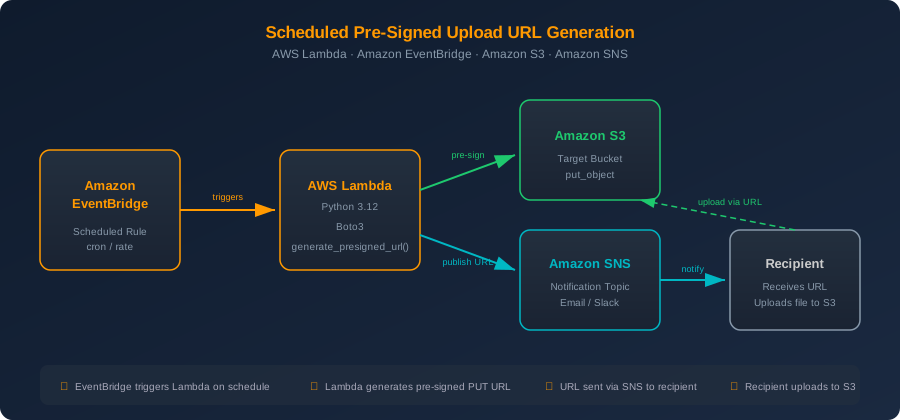
Scheduled generation of a pre-signed upload URL with AWS Lambda, EventBridge and Boto3

Cloud DevOps @ smallfries.digital
Date: 2024-07-01
Pre-signed URLs are a powerful S3 feature that lets you grant temporary, scoped access to upload or download objects without exposing your AWS credentials or making a bucket public. When combined with a scheduled Lambda function, you can automate the generation and delivery of these URLs on a recurring basis — useful for scenarios like periodic data ingestion from external partners, scheduled report uploads, or any workflow where a third party needs time-limited write access to your S3 bucket.
In this post we'll build a solution where Amazon EventBridge triggers an AWS Lambda function on a schedule, the function generates a pre-signed PUT URL for a specific S3 key, and then publishes that URL to an Amazon SNS topic so it can be delivered via email, Slack or any other subscriber.
How pre-signed URLs work
When you call generate_presigned_url() via Boto3, the S3 client signs the request using your Lambda function's IAM credentials. The resulting URL encodes the bucket, key, expiration and signature as query parameters. Anyone with the URL can perform the allowed operation (in our case put_object) until the URL expires — no AWS credentials required on their end.
Security note: The pre-signed URL inherits the permissions of the IAM principal that generated it. Make sure your Lambda execution role has only the minimum required S3 permissions, and keep expiration times as short as practical.
The Lambda function
Let's start with the Lambda handler. This function generates a pre-signed PUT URL and publishes it to an SNS topic.
import os
import json
import boto3
from datetime import datetime, timezone

s3_client = boto3.client("s3")
sns_client = boto3.client("sns")

BUCKET_NAME = os.environ["BUCKET_NAME"]
SNS_TOPIC_ARN = os.environ["SNS_TOPIC_ARN"]
URL_EXPIRATION = int(os.environ.get("URL_EXPIRATION", 3600))  # seconds
UPLOAD_PREFIX = os.environ.get("UPLOAD_PREFIX", "uploads")


def handler(event, context):
    """Generate a pre-signed S3 upload URL and publish it via SNS."""

    # Build a unique object key using the current UTC timestamp
    timestamp = datetime.now(timezone.utc).strftime("%Y-%m-%d_%H%M%S")
    object_key = f"{UPLOAD_PREFIX}/{timestamp}.dat"

    # Generate the pre-signed PUT URL
    presigned_url = s3_client.generate_presigned_url(
        ClientMethod="put_object",
        Params={
            "Bucket": BUCKET_NAME,
            "Key": object_key,
            "ContentType": "application/octet-stream",
        },
        ExpiresIn=URL_EXPIRATION,
    )

    # Publish the URL to SNS
    message = (
        f"A new pre-signed upload URL has been generated.\n\n"
        f"Bucket: {BUCKET_NAME}\n"
        f"Key: {object_key}\n"
        f"Expires in: {URL_EXPIRATION // 60} minutes\n\n"
        f"Upload URL:\n{presigned_url}\n\n"
        f"Example upload with curl:\n"
        f'curl -X PUT -H "Content-Type: application/octet-stream" '
        f'--data-binary @yourfile.dat "{presigned_url}"'
    )

    sns_client.publish(
        TopicArn=SNS_TOPIC_ARN,
        Subject=f"S3 Upload URL - {timestamp}",
        Message=message,
    )

    return {
        "statusCode": 200,
        "body": json.dumps({
            "bucket": BUCKET_NAME,
            "key": object_key,
            "expires_in": URL_EXPIRATION,
        }),
    }
A few things to note:
- We use
put_objectas theClientMethodbecause we want to grant upload (write) access, not download. - The
ContentTypeparameter inParamsensures the uploader must send the correct content type header. - The object key includes a UTC timestamp so each scheduled invocation produces a unique key.
URL_EXPIRATIONdefaults to 3600 seconds (1 hour) but is configurable via environment variable.
The EventBridge schedule
Amazon EventBridge (formerly CloudWatch Events) lets you trigger Lambda functions on a cron or rate schedule. For example, to generate a new upload URL every day at 8:00 AM UTC:
aws events put-rule \
  --name "daily-presigned-url" \
  --schedule-expression "cron(0 8 * * ? *)" \
  --state ENABLED \
  --description "Trigger pre-signed URL generation daily at 08:00 UTC"
Then add the Lambda function as a target:
aws events put-targets \
  --rule "daily-presigned-url" \
  --targets "Id"="1","Arn"="arn:aws:lambda:us-east-1:123456789012:function:presigned-url-generator"
Don't forget to grant EventBridge permission to invoke your Lambda:
aws lambda add-permission \
  --function-name presigned-url-generator \
  --statement-id eventbridge-daily \
  --action lambda:InvokeFunction \
  --principal events.amazonaws.com \
  --source-arn arn:aws:events:us-east-1:123456789012:rule/daily-presigned-url
You can also use a simple rate expression if you prefer:
--schedule-expression "rate(12 hours)"
IAM policy for the Lambda execution role
The Lambda function needs permission to generate pre-signed URLs (which requires s3:PutObject on the target bucket/prefix) and to publish to the SNS topic:
{
  "Version": "2012-10-17",
  "Statement": [
    {
      "Effect": "Allow",
      "Action": "s3:PutObject",
      "Resource": "arn:aws:s3:::my-upload-bucket/uploads/*"
    },
    {
      "Effect": "Allow",
      "Action": "sns:Publish",
      "Resource": "arn:aws:sns:us-east-1:123456789012:presigned-url-topic"
    }
  ]
}
Important: Pre-signed URLs will only work if the IAM role that generated them still has the required permissions at the time the URL is used. If you revoke
s3:PutObjectfrom the role, all outstanding pre-signed URLs become invalid immediately.
Testing locally
You can invoke the function locally with a test event to verify it works before deploying the schedule:
aws lambda invoke \
  --function-name presigned-url-generator \
  --payload '{}' \
  response.json

cat response.json
You should receive an SNS notification with the pre-signed URL. Test the upload with curl:
curl -X PUT \
  -H "Content-Type: application/octet-stream" \
  --data-binary @testfile.dat \
  "<presigned-url-from-notification>"
Then verify the object landed in S3:
aws s3 ls s3://my-upload-bucket/uploads/
Considerations
- URL expiration: Keep it as short as practical. For a daily schedule, 1-2 hours is usually sufficient. Longer expirations increase the window of exposure.
- Object key collisions: The timestamp-based key pattern avoids collisions for schedules down to one-second granularity. For sub-second invocations, consider adding a UUID.
- Encryption: If your bucket uses SSE-KMS, the pre-signed URL signer also needs
kms:GenerateDataKeypermission, and the uploader's request will be encrypted transparently. - CORS: If the upload will happen from a browser, configure CORS on the S3 bucket to allow PUT requests from the appropriate origin.
- Monitoring: Add CloudWatch alarms on Lambda errors and SNS delivery failures to catch issues early.
Conclusion
Combining EventBridge schedules with Lambda and Boto3's generate_presigned_url() gives you a clean, serverless pattern for recurring secure file uploads. The entire solution runs without servers to manage, scales automatically, and costs virtually nothing at low invocation volumes. You can extend this pattern by adding S3 event notifications to trigger downstream processing when the upload completes, or by integrating with Step Functions for more complex workflows.